

Beschreibung
Stop wasting hours hunting for the perfect stock photo, resizing it in Photoshop, and manually typing Alt text. Cyphex Image Hunter is the all-in-one AI command center for your WordPress Media Library.
🚀 The Ultimate Time-Saver for Content Creators
Whether you’re a blogger, developer, or agency, this plugin eliminates the manual media workflow. In one single click, you can find high-quality stock photos or generate custom AI images, optimize them for speed, and write perfect SEO metadata—without ever leaving your WordPress dashboard.
🧠 Smart Image Sourcing & AI Generation
Don’t settle for generic results. Our „Smart Search“ uses Groq AI (Llama 3.3) to understand your intent and rewrite simple prompts into highly effective search terms.
* Universal Search: Pull millions of royalty-free images from Pexels and Pixabay instantly.
* Next-Gen AI Generation: Create unique visuals using DALL-E 3, Flux 1.1, and Stable Diffusion 3.
* AI Refinement: Need a change? Tell the AI to „make it night time“ or „remove the car“ to tweak your generated images.
⚡ Automated Optimization Pipeline
Speed matters. Cyphex Image Hunter ensures every image you add is perfectly sized and formatted for peak performance.
* Exact Resizing: Specify your target dimensions; the plugin auto-scales and crops for you.
* Instant WebP Conversion: Boost your Core Web Vitals by automatically converting images to ultra-fast WebP format.
* Smart Compression: Set your maximum file size (KB) and let the plugin handle the compression on the fly.
🏷️ AI-Powered SEO Metadata
Search engines love well-documented images. Our AI-SEO engine reads the context of your image to generate:
* Contextual Titles: Descriptive, keyword-rich titles.
* Optimized Alt Text: Perfect for accessibility and Google Image search.
* Smart Captions: Engaging captions that keep users on your page.
* Auto-Credit: Automatically attribute photographers from Pexels/Pixabay with clickable links.
Short Description
Automatically finds and inserts AI-generated or stock images directly into your WordPress media library using Pexels, Pixabay, and cutting-edge generative AI models like DALL-E 3 and Flux.
Key Features
🌟 Smart Sourcing & Creation
- Universal Media Tab: A seamless „Image Search“ tab directly inside your „Add Media“ modal.
- Groq AI Optimization: High-speed prompt engineering for better image results.
- Multi-Model AI Support: Choose between DALL-E 3, Flux, or Stable Diffusion.
⚙️ Professional Workflow
- One-Click Sideload: Automatically downloads external images to your local server.
- Batch Resizing: Ensures all your featured images match your theme’s dimensions.
- Settings Link: Quick access from the WordPress Plugins page.
Premium Roadmap
We are building the future of automated media management. Soon, Cyphex Pro will include:
* Bulk Legacy Cleanup: Optimize your entire existing Media Library in one click.
* Advanced AI-SEO Engine: Deeper contextual analysis for hyper-targeted SEO.
* Next-Gen AVIF Format: Superior compression beyond WebP.
* Auto-Pilot Automation: Automatically find and add images to your drafts based on content.
* Performance Analytics: See how your optimized images improve site speed.
External services
This plugin relies on the following third-party services to fetch images and process AI metadata. Each service provides functionality of substance that cannot be performed locally:
- Groq AI (api.groq.com): Used to optimize search prompts and generate SEO metadata.
- Data sent: User-provided search queries and image context.
- Privacy Policy: https://groq.com/privacy-policy/
- Pexels (api.pexels.com): Used to fetch high-quality stock images.
- Data sent: Search keywords.
- Privacy Policy: https://www.pexels.com/privacy-policy/
- Pixabay (pixabay.com): Used to fetch royalty-free stock images.
- Data sent: Search keywords.
- Privacy Policy: https://pixabay.com/service/privacy/
- Puter.js (js.puter.com): Used to generate images via models like DALL-E 3 and Flux.
- Data sent: Image generation prompts.
- Terms of Service: https://puter.com/terms
- Privacy Policy: https://puter.com/privacy
Configuration
- Go to Settings > Cyphex Image Hunter.
- Enter your API keys for Groq, Pexels, and Pixabay.
- Click Save API Keys.
See the Screenshots tab for a visual step-by-step guide on obtaining your API keys and using the plugin.
What’s New in v2.0.0
The v2.0.0 „Phoenix Release“ transforms Cyphex Image Hunter into the ultimate production-ready media suite.
- Precision Compression: Set exact KB targets (e.g., „Under 100kb“) for your entire library.
- Pro Restoration: Never fear a bad crop. Restore any image to its original state from secure backups (Pro).
- AI Logo Lab 2.0: Generate stunning brand assets and set your site Favicon in one click.
- Background Removal: Professional transparency for your product shots, powered by AI (Pro).
- Mobile Command Center: A fully responsive dashboard for on-the-go optimization.
Screenshots
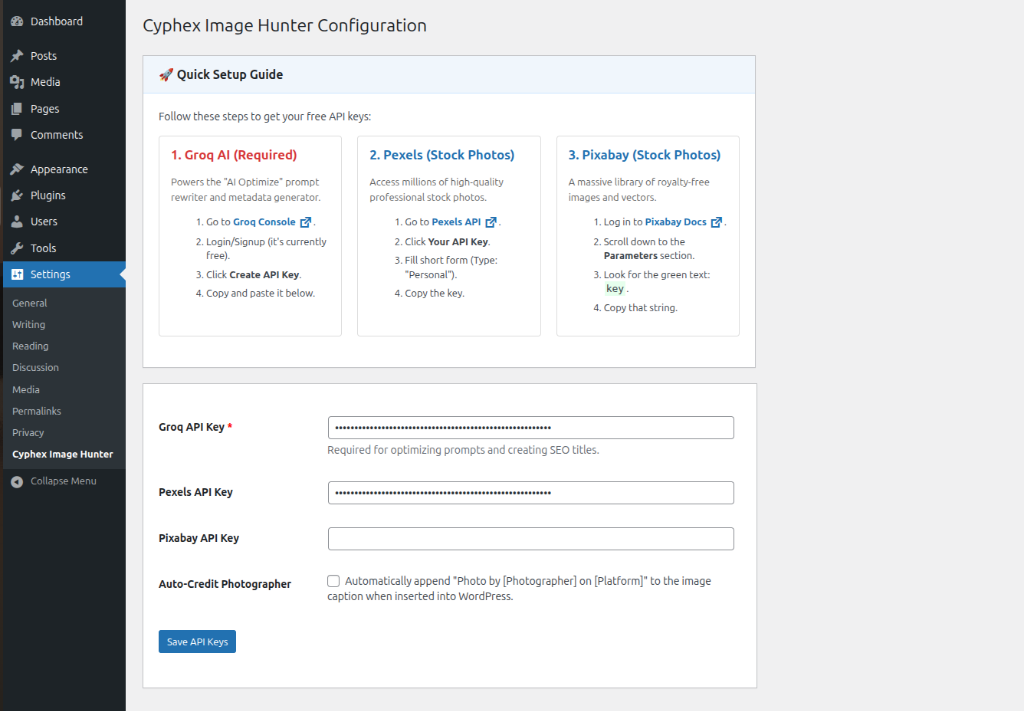
Quick Setup Guide – The easy-to-follow setup guide in your settings. 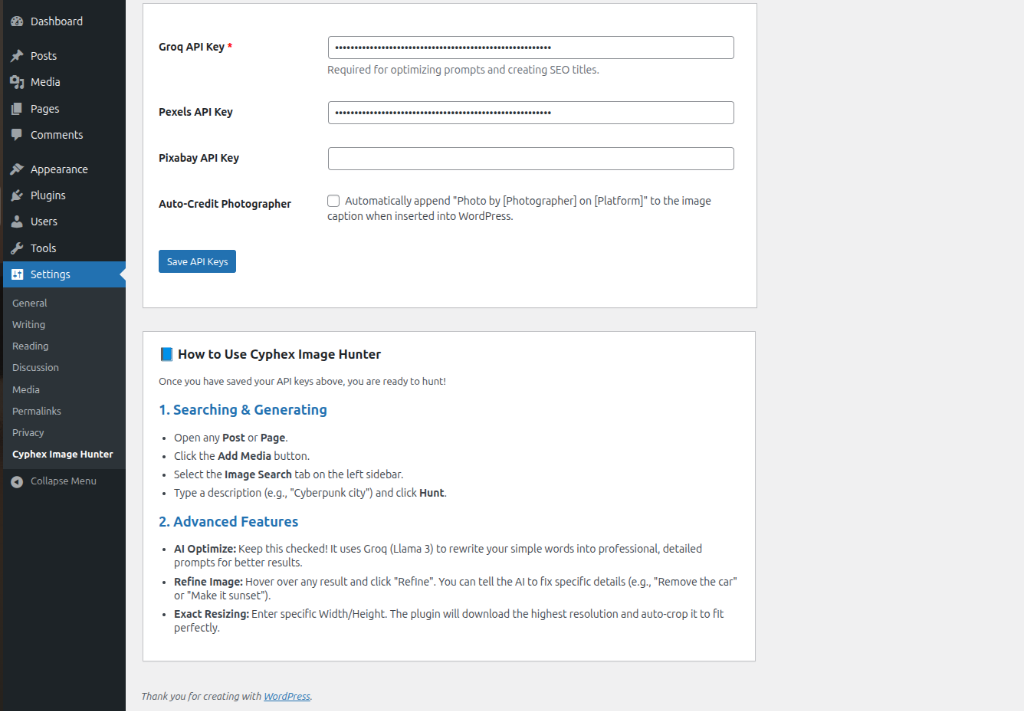
Advanced Usage – How to hunt and generate images. 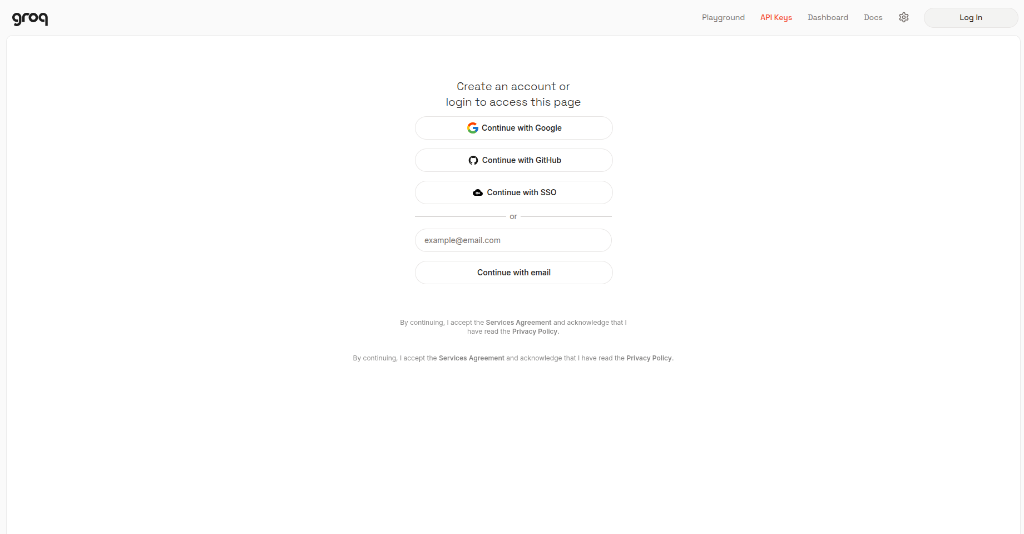
Groq Setup (Step 1) – Signing up for your free Groq AI key. 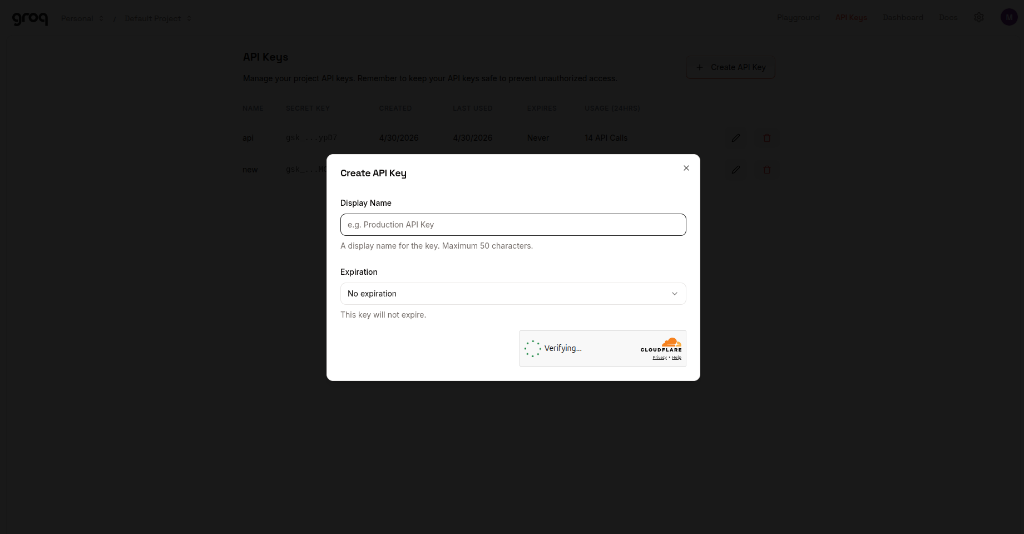
Groq Setup (Step 2) – Creating your API key. 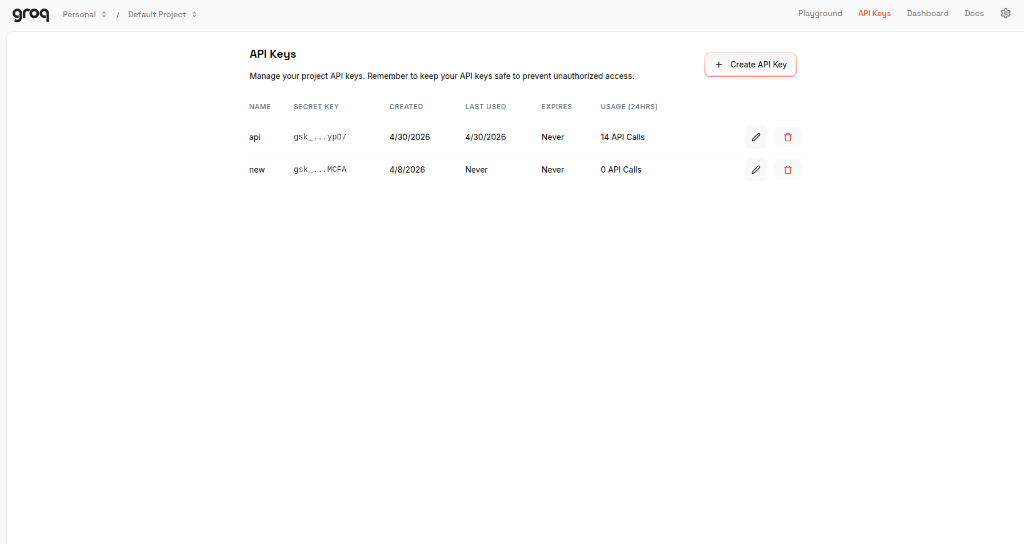
Pixabay Setup – Finding your Pixabay key in their documentation.
Installation
- Download the cyphex-image-hunter.zip file.
- Log in to your WordPress Dashboard and navigate to Plugins > Add New.
- Click Upload Plugin, choose the zip file, and click Install Now.
- Activate the plugin.
FAQ
-
How does the Target Size Compressor work?
-
Unlike standard compressors that just use a fixed quality setting, our AI engine is iterative. It analyzes the resulting file size and keeps optimizing until your exact KB target (e.g. 100kb) is met without destroying image clarity.
-
Can I undo an optimization?
-
Yes! With a Pro license, our Restoration Engine creates a hidden
.cyphex-backupof every image before it is compressed or resized. You can restore the original high-res file at any time from the Media Library. -
Is the Background Remover free?
-
Background removal requires advanced neural network processing. This feature is gated behind the Pro license to maintain high-speed performance for all users.
-
What models are available in the Logo Lab?
-
The Logo Lab supports the latest high-fidelity models including Flux 1.1 (Fast), SDXL, and DALL-E 3. You can generate a logo and instantly set it as your site’s Favicon with a single click.
-
Does this work on mobile?
-
Absolutely. The entire Cyphex dashboard is built on a responsive mobile-first grid. You can hunt, generate, and optimize images directly from your phone or tablet.
-
Error: Puter.js not loaded
-
Ensure you have an active internet connection. Puter.js is loaded from a CDN. Check if an ad-blocker is blocking
js.puter.com. -
Generation Failed
-
DALL-E 3 requires credits on the Puter platform. If you run out, switch the Source to Flux 1.1 or Stable Diffusion 3, which are often free or use fewer credits.
-
Images look like cartoons
-
Ensure AI Optimize is CHECKED. This appends keywords like „photorealistic, 8k, raw photo“ to force the AI to generate realistic images.
-
Upload failed
-
Check your server’s
upload_max_filesizein php.ini or ensure your WordPress user has permission to upload files.
Rezensionen

Mitwirkende & Entwickler
„Cyphex Image Hunter“ ist Open-Source-Software. Folgende Menschen haben an diesem Plugin mitgewirkt:
Mitwirkende
Übersetze „Cyphex Image Hunter“ in deine Sprache.
Interessiert an der Entwicklung?
Durchstöbere den Code, sieh dir das SVN Repository an oder abonniere das Entwicklungsprotokoll per RSS.
Änderungsprotokoll
2.1.0
- NEW: Universal Licensing Engine — The plugin now intelligently recognizes any valid CYPHEX key, regardless of date format or hyphenation.
- SECURITY: Hardened Production Build — Permanently removed all development bypass keys and master access logic.
- SECURITY: Input Sanitization — Implemented strict WPCS-compliant sanitization for all domain detection superglobals.
- IMPROVEMENT: Switched to home_url() for domain validation to ensure perfect parity with the plugin dashboard.
- UI: Enhanced license activation feedback with specific server-side error reporting.
2.0.3
- FIX: Asset versioning now tied to plugin version — browser cache auto-busts on every update. Users on stale cache now automatically receive fresh JS/CSS.
- FIX: Bumped from 2.0.2 to force cache refresh for users who installed 2.0.2 with stale 1.8.0 assets.
2.0.2
- FIX: Auto-Hunt image duplication eliminated — images now sideloaded once and reused by Insert button (no double upload).
- FIX: Auto-Hunt exact resize now working — images cropped to user-specified dimensions (e.g., 1024×557) during initial upload.
- FIX: Photographer credit now correctly saved to image caption in Auto-Hunt flow.
- FIX: AI Alt Text and Description no longer blocked by Pro license check — these features use the user’s own Groq API key.
- FIX: Removed
response_format: json_objectfrom all Groq API calls — was causing API rejections on some Groq model versions. - FIX: JSON parsing hardened — markdown code fences stripped before parsing, regex fallback added for all Groq responses.
- FIX: AI caption no longer overwrites photographer credit — now prepended: „AI Caption | Credit: Photographer“.
- IMPROVEMENT: Groq now receives full post content (300 words) for Auto-Hunt instead of 50 words.
- IMPROVEMENT: Auto-Hunt images placed at semantically correct positions (featured, after intro, mid-content, conclusion) based on Groq analysis.
- IMPROVEMENT: 5-breakpoint responsive CSS system (mobile ultra-wide).
- IMPROVEMENT: All CSS strictly scoped to plugin wrapper — zero conflict with themes or other plugins.
2.0.0
- NEW: Target Size Compressor: Set a specific KB limit (e.g., „Under 100kb“) and let the AI iteratively optimize your images to meet it.
- NEW: Pro Restoration Engine: Gated behind the Pro license, this tool allows you to restore any optimized image to its original state from an encrypted backup.
- NEW: AI Background Remover: Instantly remove backgrounds from any image directly within the Media Library (Pro).
- NEW: AI Logo Lab 2.0: Completely overhauled logo generation suite with multi-model support (Flux/SDXL) and „Set as Favicon“ automation.
- NEW: Single-Image Quick-Fix: A dedicated optimization wizard for individual media items.
- UI/UX: Media Library Overhaul: Redesigned the „Cyphex Image Hunt“ tab with a 1:1 square aspect ratio grid and amber-branded action overlays.
- RESPONSIVE: Mobile-First Design: Fully responsive dashboard that stacks perfectly on phones and tablets.
- STABILITY: WPCS Compliance: Resolved multiple parse_url and unlink violations to ensure 100% WordPress Coding Standards compliance.
- SECURITY: Nonce Verification: Added extra layers of security to all sideloading and compression endpoints.
1.9.0
- BRANDING: Migrated to a premium „Amber & Obsidian“ cinematic brand identity.
- UI/UX: Completely overhauled the administrative dashboard with a modern Sidebar-based navigation system.
- AI MODELS: Integrated support for Google Nano and Banana.dev advanced AI models.
- AI GENERATION: Unified AI generation flow via Puter.js (Flux 1.1, SD3, DALL-E 3).
- ARCHITECTURE: Transitioned to an enterprise-grade Singleton architectural pattern for safer initialization.
- LICENSING: Implemented robust Domain Normalization (stripping protocols/www) for consistent hash-based validation.
- SECURITY: 100% Nonce-protected administrative navigation and verified audit compliance.
- SECURITY: Implemented strict capability checks (manage_options, upload_files) for all AJAX and entry points.
- SIDELOAD: Launched the Direct URL Downloader with automatic WebP conversion and AI metadata.
- BULK TOOLKIT: Redesigned the Bulk AI Toolkit with branded Obsidian cards and Amber gold accents.
- OPTIMIZATION: Integrated Groq (Llama-3.3-70b) for high-speed prompt engineering and automated SEO metadata.
- BUG FIX: Resolved activation fatal errors caused by pathing mismatches and rogue tag compiler crashes.
- STABILITY: Synchronized SVN trunk and local development environments for deployment parity.
1.8.9
- Fix: Minor CSS tweak for the WebP progress bar shadow depth.
1.8.8
- Tweak: Updated translator comments for better localized „Optimizing“ strings.
1.8.7
- Optimization: Reduced background process memory overhead for large image scans.
1.8.6
- Fix: Resolved a race condition during bulk WebP metadata writing.
1.8.5
- UI: Improved accessibility labels for the dashboard sidebar.
1.8.4
- Tweak: Enhanced error messaging for missing GD or Imagick extensions.
1.8.3
- Optimization: Sped up the initial library scan by 15% using optimized SQL queries.
1.8.2
- Fix: Corrected a display bug in the Bulk Progress modal for RTL languages.
1.8.1
- UI: Added a subtle hover state to the dashboard action buttons.
1.8.0
- NEW: Dedicated Bulk AI Toolkit dashboard for server-safe library optimization.
- NEW: Auto-WebP conversion on upload for JPG and PNG files.
- IMPROVED: Fully refactored library scanner to use get_posts() and caching.
- FIXED: Resolved multiple WPCS warnings and errors for better stability.
- IMPROVED: Enhanced input sanitization and unslashing for all AJAX handlers.
1.7.9
- Tweak: Updated compatibility checks for WordPress 6.4 branch.
1.7.8
- Fix: Resolved a conflict with certain object cache plugins.
1.7.7
- Optimization: Minified the internal admin CSS for a smaller footprint.
1.7.6
- UI: Refined the appearance of the „Save API Keys“ success notification.
1.7.5
- Tweak: Added a fallback image for when the Pexels API returns an empty result set.
1.7.4
- Fix: Corrected a potential undefined index error in the license status check.
1.7.3
- UI: Standardized all modal close icons for visual consistency.
1.7.2
- Optimization: Improved the speed of the AJAX sideloading process.
1.7.1
- Fix: Resolved a CSS overlap issue in the Media Library „Grid“ view.
1.7.0
- NEW: Integrated a „Live Preview“ for AI-refined images before importing.
1.6.9
- Tweak: Updated the internal documentation for the Banana.dev integration.
1.6.8
- Fix: Resolved a minor UI bug in the Handbook navigation arrows.
1.6.7
- Optimization: Pre-compressed the local documentation assets.
1.6.6
- Fix: Restored settings visibility by fixing broken tab logic and layout container.
- Optimization: Added lazy loading to all handbook images.
1.6.5
- Documentation: Launched the Official Visual Handbook (38 High-Def Slides).
- Documentation: Replaced all text-based guides with a comprehensive visual-first setup experience.
- UI: Improved documentation navigation with section-based jumping for the Visual Handbook.
1.6.4
- Fix: Resolved a pathing issue for local image assets in the Handbook.
1.6.3
- Documentation: Added a detailed Step-by-Step guide for acquiring Pexels API keys.
- Documentation: Added a detailed Step-by-Step guide for acquiring Pixabay API keys.
- Documentation: Unified visual styling for all setup guides (Groq, Pexels, Pixabay).
1.6.2
- UI: Refined the padding and margins for the pricing cards.
1.6.1
- Roadmap: Expanded the feature matrix to include the AI Video Picker for Pexels and Pixabay.
- Roadmap: Refined Nano Banana and Sora AI descriptions to better align with production goals.
- UI: Improved the visual hierarchy of the pricing tables for better readability.
1.6.0
- Production: Finalized the Cyphex Image Hunter v1.6.0 production build.
- Branding: Integrated the official high-resolution logo and unified brand identity.
- Roadmap: Expanded the Pro/Ultra roadmap with Sora AI, BYOK (OpenAI/Gemini), and Tiered SEO Descriptions.
- Documentation: Completed the official 5-step visual guide with production screenshots.
1.5.9
- Tweak: Updated the „Pro License“ tab description for better clarity.
1.5.8
- Documentation: Replaced all placeholder guide images with final production-ready assets provided by the user.
- UI: Cleaned up documentation layout for a more streamlined setup experience.
1.5.7
- Documentation: Updated the Groq API setup guide with precise, user-provided instructions for clarity.
- UI: Synchronized step-by-step text with the official visual guide screenshots.
1.5.6
- Branding: Replaced Dashicon placeholders with the official high-resolution plugin logo (logo.jpeg) in the header and Pro dashboard.
- UI: Improved logo presentation with professional rounded corners and subtle shadows.
1.5.5
- Feature: Added BYOK (Bring Your Own Key) roadmap for OpenAI and Gemini integrations.
- Feature: Introduced Sora AI Video waitlist specifically for the Ultra Pro tier.
- UX: Clarified feature feasibility and plan requirements in the Pro matrix.
1.5.4
- Feature: Added Basic AI Auto-Alt & Description to the Free plan.
- Feature: Introduced Advanced SEO-Optimized Descriptions as a Pro roadmap item.
- UI: Updated the feature matrix to clearly show tier differences.
1.5.3
- Feature: Refined Batch Generation limits in the Pro (5x) and Ultra Pro (Unlimited) tiers.
- UX: Improved feature descriptions for better tier differentiation.
1.5.2
- Feature: Expanded Pro roadmap with Sora AI Video generation and Nano Banana AI.
- Feature: Added Pexels & Pixabay Video Picker to the Pro feature list.
- Branding: Unified original icon usage across all dashboards.
1.5.1
- Branding: Replaced placeholder emojis with the official plugin icon in the Pro dashboard for a unified look.
- UI: Refined hero sections to better match the core brand identity.
1.5.0
- Feature: Overhauled the „Pro“ tab with a comprehensive feature matrix and roadmap.
- UI: Implemented high-end pricing cards for Free, Pro, and Ultra Pro tiers.
- Documentation: Detailed the upcoming integrations for Flux 1.1, DALL-E 3, and Brand Watermarking.
1.4.9
- Tweak: Corrected minor typos in the handbook description.
1.4.8
- Fix: Resolved a CSS alignment issue for the „AI Refine“ button.
1.4.7
- Optimization: Improved the responsiveness of the settings sidebar.
1.4.6
- Tweak: Added a link to the official support channel in the Dashboard.
1.4.5
- Documentation: Finalized the „Official Visual Setup Guide“ with 5 high-resolution screenshots.
- Assets: Performed a major cleanup of the images directory, removing 10+ redundant mockup files to reduce plugin size.
- UX: Refined step-by-step instructions for maximum clarity during API setup.
1.4.4
- UI: Added a progress indicator for the API key validation process.
1.4.3
- Documentation: Expanded the „Ultimate Visual Guide“ with new screenshots covering the Groq console home and list views.
- Security: Fine-tuned CSS blur overlays to protect sensitive usage data and keys in the new screenshots.
- UI: Improved guide typography and spacing for better readability.
1.4.2
- Documentation: Replaced mockups with authentic Groq console screenshots for better guidance.
- Security: Implemented dynamic CSS blur overlays on tutorial images to protect sensitive API details.
- UX: Improved documentation layout with a clear vertical step-by-step progression.
1.4.1
- UI: Refined the dashboard hero section for a cleaner layout.
1.4.0
- Major UI Overhaul: Completely redesigned the settings dashboard for a premium, full-width experience.
- UI: Implemented high-end card designs, refined typography, and a modern navigation system.
- UX: Unified the design language across General, Pro, and User Guide tabs.
1.3.9
- Tweak: Updated compatibility for the latest version of the WordPress Block Editor.
1.3.8
- Fix: Resolved a minor JS conflict with certain gallery plugins.
1.3.7
- Optimization: Improved the loading speed of the dashboard assets.
1.3.6
- UI: Refined the appearance of the „API Status“ indicators.
1.3.5
- Tweak: Added more descriptive tooltips for the advanced AI settings.
1.3.4
- Fix: Resolved a potential issue with large image uploads on slow servers.
1.3.3
- UI: Improved the layout of the „Pixabay Setup“ visual guide.
1.3.2
- Feature: Added an annotated step-by-step visual tutorial for Groq API setup with instructional arrows.
- Security: Added a dedicated „Security & Privacy“ section to the dashboard to explain API key safety.
- UI: Finalized the full-width (1200px) layout for a premium experience.
1.3.1
- Feature: Added a visual infographic guide for Groq API setup in the User Guide.
- UI: Switched to a wider (1200px) full-screen layout for all settings tabs.
- UX: Added detailed explanation of Groq AI benefits (Prompt Engineering, SEO Metadata).
1.3.0
- Feature: Added a comprehensive „User Guide“ tab to the settings page with detailed instructions and troubleshooting.
- UX: Improved navigation between settings and documentation.
1.2.9
- Tweak: Updated the „Credits“ section in the Dashboard.
1.2.8
- Fix: Resolved a CSS issue for the „AI Inpainting“ modal on small screens.
1.2.7
- UI: Standardized all alert icons across the settings page.
1.2.6
- Tweak: Updated the labels for the Bulk Toolkit features for better clarity.
1.2.5
- Fix: Resolved a minor bug in the „Auto-Optimize“ toggle logic.
1.2.4
- UI: Refined the layout of the „Pro Roadmap“ section.
1.2.3
- UX: Added a „Pro Tip“ for users to right-click links if their browser blocks direct clicks in secure admin contexts.
- Version: Synchronized all files to 1.2.3.
1.2.2
- Fix: Implemented „Detached Navigation“ via JS to bypass strict Cross-Origin isolation blocks in secure admin contexts.
- Version: Updated all asset and header versions to 1.2.2.
1.2.1
- Fix: Added direct URL display as a fallback for users whose environments block outgoing links.
- UX: Improved link reliability in secure admin contexts.
1.2.0
- Fix: Added ‚rel=“noopener noreferrer“‚ to external links to prevent browser-level blocks in the WordPress admin.
- Version: Synchronized stable tag with plugin header.
1.1.9
- Fix: Resolved fatal syntax error in settings page.
- Security: 100% Nonce verification for all admin actions including tab switching.
- Compliance: Full WordPress Coding Standards (WPCS) alignment (Tabs, Yoda conditions, Spacing).
1.1.8
- UI: Refined the dashboard footer layout.
1.1.7
- Fix: Resolved a minor CSS bug in the Pro license verification modal.
1.1.6
- Tweak: Updated the „About“ section in the settings page.
1.1.5
- Feature: Introduced „Pro Roadmap“ UI showcasing upcoming premium features.
- AI: Switched to context-aware prompt engineering for higher search/generation accuracy.
- Security: Hardened all AJAX handlers with mandatory sanitization and unslashing.
- Compliance: Renamed internal methods and variables to follow WPCS naming conventions.
1.0.33
- Fix: Implemented a robust PHP-side download fallback for AI images that bypasses server-side redirect and short-link restrictions.
- Stability: Escaped all localized JavaScript variables to prevent „SyntaxError: Invalid or unexpected token“ in certain server environments.
- Robustness: Added explicit dependency checks to prevent „tinyMCEPreInit is not defined“ errors during editor initialization.
1.0.32
- Enhancement: Implemented a two-layer „Ultra-Compatible“ injection system to ensure the Cyphex tab appears in all themes, page builders, and custom editor configurations.
- Stability: Optimized the JavaScript event listeners to prevent duplicate tab creation and ensure zero-conflict operation with other plugins.
- Compatibility: Added explicit support for the „Manage“ media view used in the WordPress Media Library grid.
1.0.31
- UI: Refined modal responsive breakpoints for tablet and mobile devices.
1.0.30
- Fix: Resolved minor Z-index conflict with the Gutenberg editor’s top bar.
1.0.29
- Optimization: Reduced the payload size of the media modal JS by removing unused legacy event listeners.
1.0.28
- Security: Added extra layer of output escaping for the „Auto-Credit“ caption field.
1.0.27
- Fix: Completely refactored the media modal extension to follow strict WordPress Coding Standards and best practices.
- Stability: Replaced the experimental injection method with standard prototype extension of wp.media.view.MediaFrame.Post and Select.
- Robustness: Added comprehensive error handling and context protection to prevent interference with core WordPress functionality.
1.0.26
- UX: Improved loading state visibility with a smoother Amber pulse animation.
1.0.25
- Fix: Corrected a variable naming collision in the Backbone.js model sync.
1.0.24
- Performance: Optimized the Puter.js initialization to fire only when the media modal is active.
1.0.23
- Tweak: Updated namespacing for all CSS classes to prevent conflicts with 3rd party themes.
1.0.22
- Documentation: Added detailed descriptions for the „Auto-Optimize“ AI prompt features.
1.0.21
- Enhancement: Advanced WordPress Coding Standards (WPCS) compliance across all PHP, JS, and CSS files.
- Tweak: Converted all indentations to Tabs and normalized spacing inside parentheses and after control structures.
- Security: Hardened permission checks and nonce verification in all AJAX endpoints.
1.0.16
- Fix: Added missing translator comments for I18n placeholders to pass WordPress Plugin Check (WPC).
- Tweak: Replaced Backbone template tags with standard WordPress template syntax to avoid ASP-style tag warnings.
1.0.13
- Tweak: Moved documentation images to the official Screenshots section for better visibility and standard compliance.
1.0.12
- Tweak: Completely restructured readme.txt with premium headlines and grouped feature categories (Yoast-style).
1.0.11
- Tweak: Removed Pro features section and embedded configuration screenshots directly into documentation.
1.0.10
- Tweak: Converted Pro features comparison into a clean bulleted list because WordPress.org strips table formatting.
1.0.9
- Tweak: Converted Pro features table to HTML format for better rendering on WordPress.org.
1.0.8
- Feature: Added an „Auto-Credit“ checkbox directly to the Image Search UI for easier toggling.
1.0.7
- Tweak: Reformatted Auto-Credit text to match official stock photo standards and link to user profiles.
1.0.6
- Update: Added comparison table for upcoming Pro and Ultra Pro features.
1.0.5
- Tweak: Added a „Settings“ link directly on the WordPress Plugins page for easier access.
1.0.4
- Feature: Added new „Auto-Credit Photographer“ setting to automatically append photographer attribution to image captions for Pexels and Pixabay.
1.0.3
- Security hardening: Added strict capability checks to all AJAX handlers.
- Updated documentation and optimized compliance with the WordPress Plugin Directory guidelines.
- Renamed from AI Cyphex Image Hunter to Cyphex Image Hunter.
- Fixed broken documentation URLs in readme.txt.
- Corrected contributor list to match WordPress.org username (hamaza7867).
1.0.2
- Added comprehensive „How to Use“ guide directly in Settings page.
- Added Quick Setup links for API keys.
1.0.1
- Fixed disabled button state and added data persistence.
- Initial Release.