
Direkt zum Inhalt wechseln
WordPress.org

Deutsch (Österreich)

  • Themes
  • Plugins
  • Über
  • Community
  • FAQ
  • Get WordPress
Get WordPress
WordPress.org

Plugin Directory

Social Media Widget

  • Submit a plugin
  • My favorites
  • Log in
  • Submit a plugin
  • My favorites
  • Log in

Dieses Plugin ist nicht mit den jüngsten 3 Hauptversionen von WordPress getestet worden. Es wird möglicherweise nicht mehr gewartet oder unterstützt und kann Kompatibilitätsprobleme haben, wenn es mit neueren Versionen von WordPress verwendet wird.

Social Media Widget

Von ashirbad.cs
Herunterladen
  • Details
  • Rezensionen
  • Installation
  • Entwicklung
Support

Beschreibung

Easily create beautiful social media link with the install of this plugin.This widget takes a simple, extendable approach for displaying your social media profiles on wordpress website.

Social Media Widget

*Social media widget which let’s you add icons for Facebook, Twitter, Google+, Pinterest.

This plugin helps you add social Profiles to your wordpress Website .

Screenshots
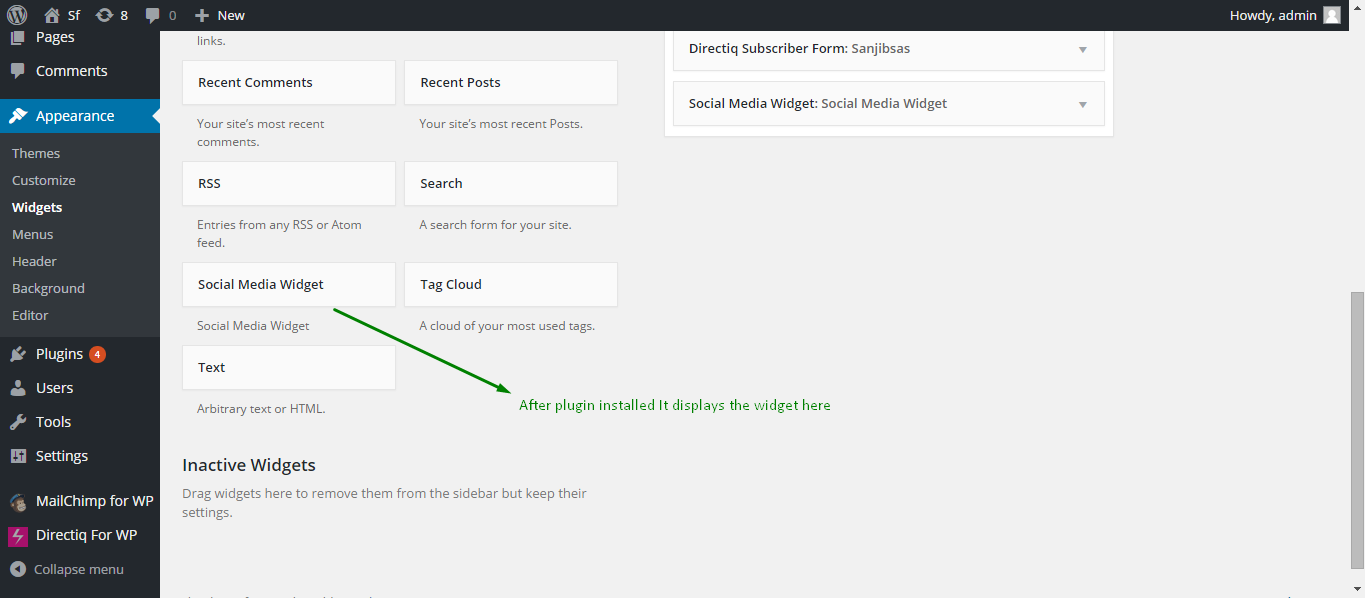
  • Social Media Widget Display
  • Social Media Widget setup

Installation

Installing the plugin

  1. In your WordPress admin panel, go to Plugins > New Plugin, search for Social Media Widget and click „Install now„
  2. Alternatively, download the plugin and upload the contents of social-media-widget.zip to your plugins directory, which usually is `/wp-content/plugins/.
  3. Activate the plugin.
  4. Set social Link Url to the widget.

Configuring Social Media Widget

  1. Go to *Social media widget Widget In Apperance->widget -> Sidebar/Footer Widget Section
    2.Change the Widget Name For displaying in the website.

FAQ

Where can I find social Media Widget?

Go to Appearance > Widgets and use the Social Media Widget** widget that comes with the plugin.

How to display a form in widget areas like the sidebar or footer?

1.Go to Appearance > Widgets and use the Social Media Widget** widget that comes with the plugin.
2. Go to *Social media widget Widget In Apperance->widget -> Sidebar/Footer Widget Section

Rezensionen

Works perfectly

bithikapadhi 2. Juli 2018
Nice one. I really like this plugins ,because its very easy to use.

Works perfectly

Maiboell74 3. September 2016
Just works perfectly! Thanks

Nice Plugin

jeebandeep 3. September 2016
Its very user friendly. Simple ease of access.

Nice Plugin

rakesh mohanta 3. September 2016
It’s working like a charm. Keep up the good works 🙂

Good!

robesv 3. September 2016
Thanks for the really simple plugin. It does what it promises. I’ll love to have also a link for those who want to send me an e-mail.
Lies alle 5 Rezensionen

Mitwirkende & Entwickler

„Social Media Widget“ ist Open-Source-Software. Folgende Menschen haben an diesem Plugin mitgewirkt:

Mitwirkende
  • ashirbad.cs

Übersetze „Social Media Widget“ in deine Sprache.

Interessiert an der Entwicklung?

Durchstöbere den Code, sieh dir das SVN Repository an oder abonniere das Entwicklungsprotokoll per RSS.

Änderungsprotokoll

1.0.0 – septmber 11, 2015

Meta

  • Version 1.0
  • Last updated vor 10 Jahren
  • Active installations 400+
  • WordPress version 4.0.1 oder höher
  • Tested up to 4.3.34
  • Language
    English (US)
  • Tags
    sidebarsocialsocial followsocial links
  • Erweiterte Ansicht

Bewertungen

5 out of 5 stars.
  • 5 5-star reviews 5 stars 5
  • 0 4-star reviews 4 stars 0
  • 0 3-star reviews 3 stars 0
  • 0 2-star reviews 2 stars 0
  • 0 1-star reviews 1 star 0

Meine Bewertung hinzufügen

See all reviews

Mitwirkende

  • ashirbad.cs

Support

Möchtest du etwas sagen? Brauchst du Unterstützung?

Supportforum anzeigen

Spenden

Möchtest du die Weiterentwicklung dieses Plugins unterstützen?

Für dieses Plugin spenden

  • About
  • News
  • Hosting
  • Privacy
  • Showcase
  • Themes
  • Plugins
  • Patterns
  • Learn
  • Support
  • Developers
  • WordPress.tv ↗
  • Get Involved
  • Events
  • Donate ↗
  • Five for the Future
  • WordPress.com ↗
  • Matt ↗
  • bbPress ↗
  • BuddyPress ↗
WordPress.org
WordPress.org

Deutsch (Österreich)

  • Visit our X (formerly Twitter) account
  • Visit our Bluesky account
  • Visit our Mastodon account
  • Visit our Threads account
  • Visit our Facebook page
  • Visit our Instagram account
  • Visit our LinkedIn account
  • Visit our TikTok account
  • Visit our YouTube channel
  • Visit our Tumblr account
Code ist Poesie.